
Passport photo size: exact dimensions and rules
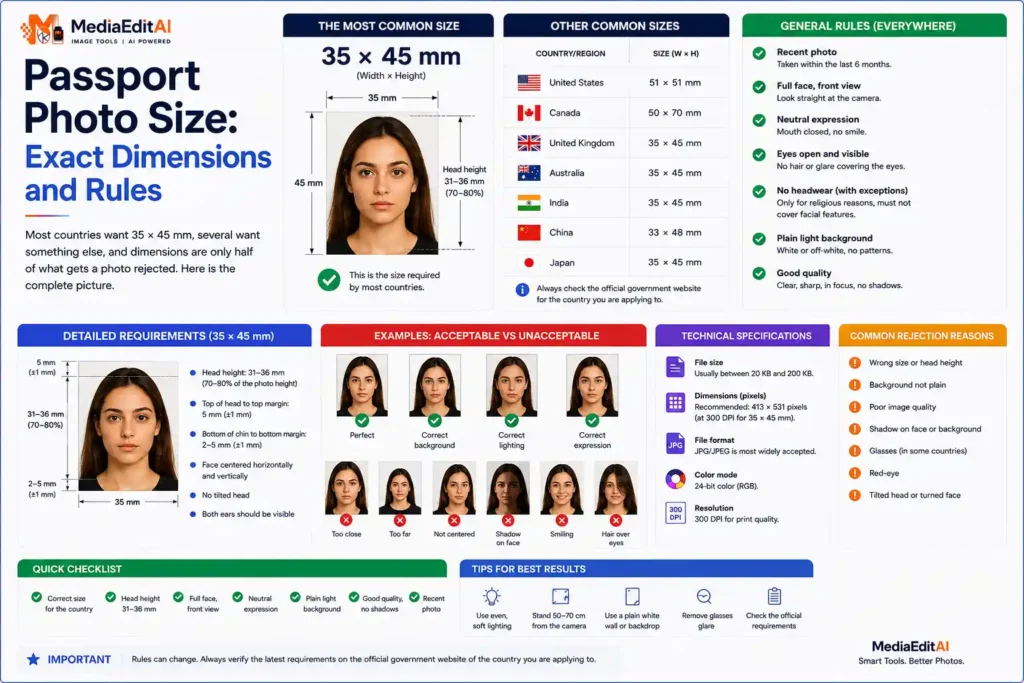
Most countries want 35 by 45 millimetres, several want something else, and dimensions are only half of what gets a photo rejected. Here is the complete picture.
The dimensions each country expects
Most countries follow the international standard of 35 by 45 millimetres, but several important ones do not. Getting the passport photo size wrong is one of the most common reasons an application is returned.
| Country / document | Millimetres | Pixels at 300 DPI |
|---|---|---|
| International standard | 35 × 45 mm | 413 × 531 |
| Schengen visa | 35 × 45 mm | 413 × 531 |
| United States | 51 × 51 mm (2 × 2 in) | 600 × 600 |
| India | 51 × 51 mm | 602 × 602 |
| Canada | 50 × 70 mm | 590 × 826 |
The pixel values assume 300 DPI, the standard for printing. Where an online portal specifies pixels directly, use its numbers rather than converting from millimetres yourself.
Always check the official source. Requirements change, and each authority publishes its own. Treat this table as a starting point, then confirm on the embassy or government site handling your application before you submit.
Rules that get photos rejected
Dimensions are only part of it. These are the requirements most applications share, and the ones people most often fail.
- Plain light background, white or off white, with no shadow falling on it behind you.
- Neutral expression, mouth closed, eyes open and clearly visible.
- Face straight to camera, not tilted or turned.
- Even lighting, no shadows across the face and no reflections.
- No glasses in most countries now, and never tinted lenses.
- Head covering only for religious reasons, and the full face must remain visible.
- Recent, generally taken within the last six months.
The passport standards published by ICAO underpin most of these, which is why the rules are so similar across countries.
How to prepare the photo
- Take it properlyStand about two metres from a plain light wall, facing a window for even natural light. Have someone photograph you from head height, not from below.
- Crop to the right ratioUse the crop tool to get the exact proportions before resizing. The head should occupy roughly 70 to 80 percent of the frame height.
- Resize to the exact pixels413 × 531 for the international standard, 600 × 600 for the United States, or whatever your authority specifies.
- Fix the background if neededIf your wall is not plain enough, remove the background and replace it with white.
- Compress to the size limitMany portals cap the file at 100 KB or less. Set an exact target rather than guessing.
Scan to open
Presets for international, US and Schengen photo sizes, plus 35 other formats. Nothing uploaded.
Fixing the background
The most common technical failure is a background that is not plain enough: a patterned wall, a visible shadow, or a colour that is not close enough to white.
You can fix this after the fact. Cut out the subject with the background removal tool, then place the result on a plain white background. Check the edges carefully around hair, since a rough cut out looks obviously manipulated and can itself cause a rejection.
It is worth saying plainly that this works best as a rescue rather than a plan. A photo taken against a genuinely plain wall in even light will always pass more reliably than one repaired afterwards.
When the portal has a file size limit
Online applications frequently combine two constraints: exact pixel dimensions and a maximum file size, often 100 KB or even 50 KB. Handle them in that order.
Set the dimensions first, then apply the size target. A 413 × 531 photo is small enough that reaching 100 KB is easy without visible quality loss. Our guide on compressing to 100 KB covers the method, and the image size guide lists document photo requirements alongside social media sizes.
If you need prints
For a printed photo, the file needs enough resolution for the physical size. At 300 DPI, a 35 by 45 millimetre photo is 413 by 531 pixels, which is the minimum you should print from.
Photo shops usually print these on 10 by 15 centimetre paper with several copies arranged on one sheet, so give them the full resolution file rather than a compressed copy prepared for an online upload. Keep both versions: one for printing, one for the portal.
Scan to open
Enter the exact limit and the tool finds the best quality that fits underneath it.
Frequently asked questions
What is the standard passport photo size?
35 by 45 millimetres, which is 413 by 531 pixels at 300 DPI. This covers most countries and Schengen visas. The United States and India use a square 51 by 51 millimetre format instead.
Can I take a passport photo at home?
Yes, and many applications accept one. Stand about two metres from a plain light wall facing a window, and have someone photograph you at head height rather than from below.
Can I change the background of my photo?
Technically yes, using the background removal tool and placing the result on white. Check the edges around hair carefully, since a rough cut out can itself cause a rejection.
Why do portals ask for 100 KB or less?
Storage and page speed across millions of applications. A 413 by 531 photo reaches 100 KB comfortably without visible quality loss.
Can I wear glasses?
Most countries now say no, and tinted lenses are refused everywhere. Check the specific authority handling your application, since this rule changed relatively recently.
Are my photos uploaded when I use these tools?
No. Everything runs inside your browser, which matters particularly here, since a passport photo is a photograph of your face attached to an identity document.
Passport photo size and how to prepare one
The standard passport photo size is 35 by 45 millimetres, which is 413 by 531 pixels at 300 DPI, and it is used by most countries and for Schengen visas. The United States and India both use a square 51 by 51 millimetre format instead, 600 by 600 pixels, and Canada uses 50 by 70 millimetres. Requirements change, so confirm on the official site handling your application before submitting.
Dimensions are only half of it. A plain light background with no shadow, a neutral expression with the mouth closed, even lighting across the face, no glasses and a recent photograph are the conditions most applications share, and they are the ones most often failed. A photo taken two metres from a plain wall facing a window, shot at head height, satisfies almost all of them at once.
Use the crop tool to set the ratio, the resizer for exact pixel dimensions, the background tool if your wall was not plain enough, and the compressor when a portal caps the file at 100 KB. Everything runs in your browser, so a photograph of your face is never uploaded to a server.
